Edit Email Details
To edit email addresses, click on the Email tab to move to the correct screen.
Whether you are able to edit these settings depend on your LA. Please see the description of the Email field.
Nominated Contacts within London schools, will see the email tab screen as seen below.
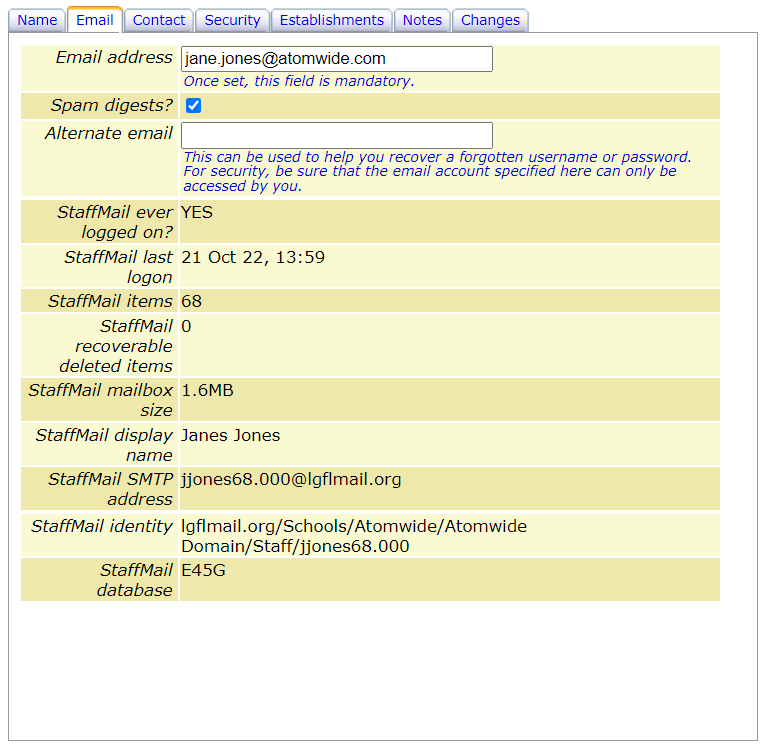
When you have finished making changes click Save changes to update or click on another tab to continue.
Mailing list membership
When USO-driven mailing list functionality is enabled via Email >> Distribution lists, the mailing lists that each person is a member of will be found under the Email tab of their account details.
All mailing lists in which the person is included will be shown under the Membership of automated mailing lists heading.
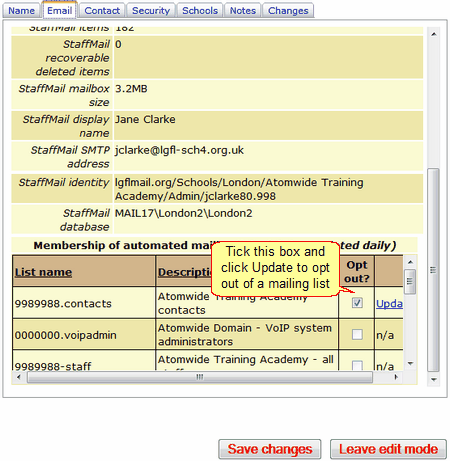
It is possible for individual members of a mailing list to unsubscribe from that list if that list allows it. The setting is controlled by a tick-box which becomes available when lists are created and edited.
If unsubscribing is allowed from any list, the tick-box to unsubscribe will be active. Tick the box and click Update.
If unsubscribing is not allowed, the tick-box will be greyed out for that list.
This feature will apply to all schools using the Distribution List functionality via the support site, but not distribution lists created via any other method.
When you have finished making changes click Save changes to update or click on another tab to continue.
If you make changes to the account that you then decide NOT to save, click Leave Edit Mode to exit without saving. Previously existing information will be restored.
See next:
Changing a user profile - adding or removing permissions
See also:
