Edit a User's Name
Use this to modify certain name fields only.
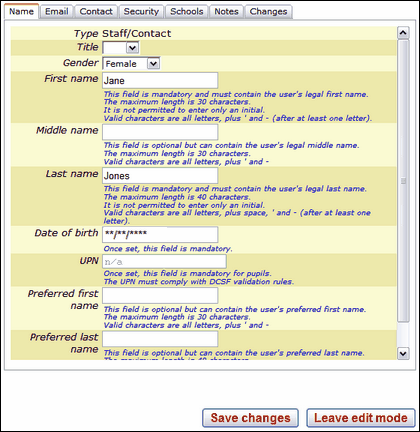
Any fields you can click in may be edited. A greyed-out field means it cannot be changed.
Gender field: can be changed even after the initial account has been created.
Preferred first name field: can be changed. See next item.
Preferred last name field: can be changed. Preferred names are supported in StaffMail and in the USO Support Site. If your school wishes to use these then a Nominated Contact should raise a support case and request this functionality.
The following fields are locked once the account has been created:
•First Name
•Last Name
•Date of Birth (if entered)
•UPN (if entered)
If any of this information in the locked fields is incorrect, please raise a case (or ask your Nominated Contact to raise it on your behalf) with the Wavenet Education Service Desk who can make the necessary amendments. If your school is running an automated export process, and this information is incorrect, please speak to your MIS team to have this data corrected.
If a legal name must be changed due to marriage or other change in legal circumstances, please notify the Service Desk who will be able to make the necessary change to account details.
After a change is made, click Save changes, if you have finished editing the account. If you need to make further changes, please select another tab and continue.
If you make changes to the account that you then decide NOT to save, click Leave Edit Mode to exit without saving. Previously existing information will be restored.
See next:
