Select the List pupils that have not been matched option to see the names of any pupils whose accounts did not match up correctly with USO data during the latest AutoUpdate.
If all accounts matched there will be no results for this search.
If there are any results, they will be displayed in a table. The columns can be re-ordered by clicking on any of the underlined headings.
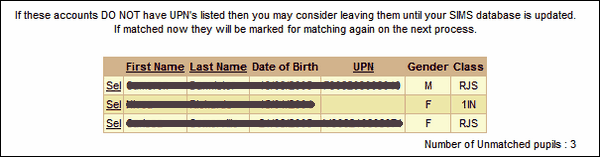
To find out why the account is unmatched and to match it to an existing account or create it as a new account click Sel to the left of the pupil's name.
 If an account does not yet have a UPN it may be best to wait until your MIS is updated rather than entering the UPN manually at this stage to avoid having to match the account twice.
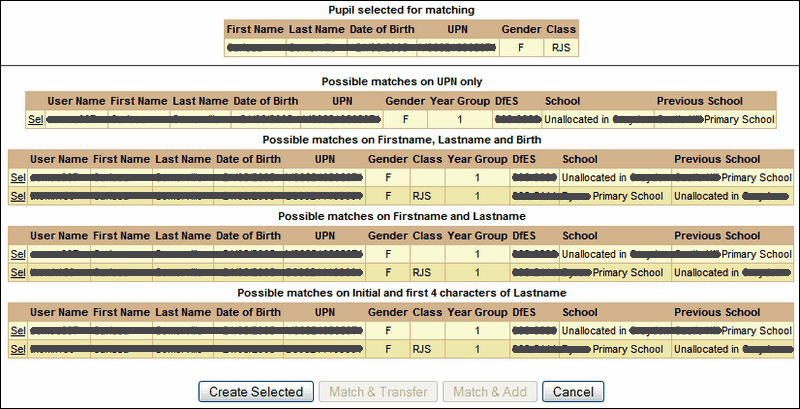
When the pupil is selected, you may be presented with a number of options as in the image above. The possible matches for this account are displayed by UPN, First name + Last name + Date of Birth, First name + Last name only, and the first 4 characters of the last name together with an initial.
In the example above there is a match for the pupil by UPN, name and date of birth. The possible match is currently Unallocated and was previously in another primary school in the borough.
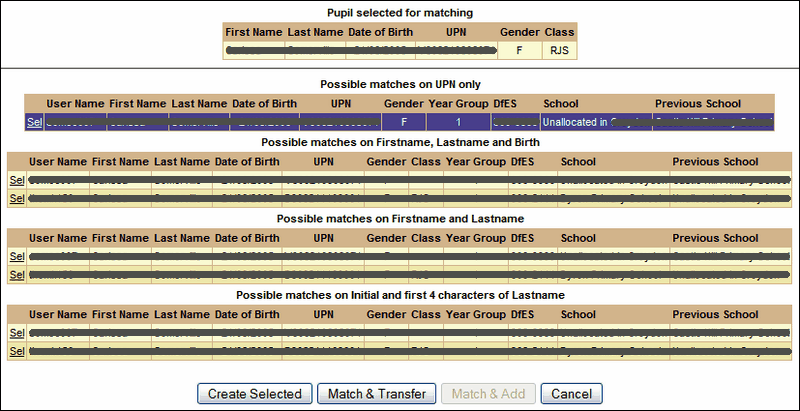
Selecting this pupil (under any heading if a match exists under all) will turn that row purple and allow you to associate this pupil with your school. The Match & Transfer button becomes enabled. Click this to transfer this pupil from the Unallocated pool into your school.

See also:
List files that have been processed
List when a school last had a file processed
Email grace period configuration
List pupils who were created as part of the process
List pupils who were transferred as part of the process
List pupils who were unallocated as part of the process
List staff that have not been matched
List staff who were created as part of the process
List staff who were transferred as part of the process
List staff who were unallocated as part of the process
