Selecting the List when a school last had a file processed option from the dropdown list automatically refreshes the screen to display a list of all the schools you have access to. Schools are listed by DCSF Code and are split into two file types: Staff details and Pupil details. You can click on any of the table headings to re-order the list in ascending or descending order by school code, school name, the date a file was last processed or any other heading.
Only Nominated Contacts associated with several schools will be able to see details for more than one school.
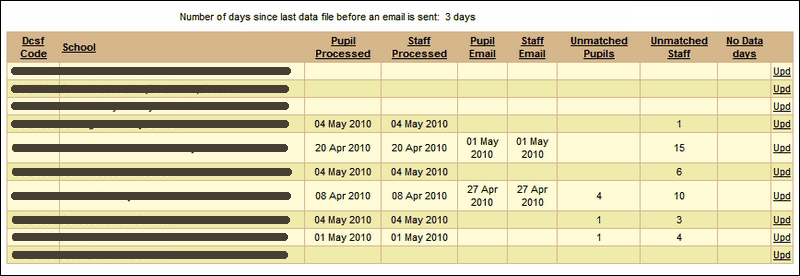
Processed files are split into Pupil files and Staff files. Different people's data may be exported at different times if needed so the Staff Processed and Pupil Processed columns may show different dates.
If these columns show a date other than the current day, this may indicate there is a problem with the AutoUpdate process. If the column is blank it means the school does not and has never exported its MIS data to Wavenet Education via an automated process.
The Unmatched Pupils and Unmatched Staff columns will show the number of accounts supplied via the automatic update that could not to be accurately matched to existing USO accounts. These will need to be individually investigated and matched or created by the Nominated Contact at the school. If this column is empty there were no unmatched accounts and no action needs to be taken.
The Pupil Email and Staff Email columns show when an automated email regarding lack of exported data was sent to the school's Nominated Contact.
By default, emails are automatically generated if a school using AutoUpdate (or other software) has not exported data for more than three days. The system then checks seven days later whether that school's data has been received. If not, another automatic email will be sent out.
See also:
List files that have been processed
Email grace period configuration
List pupils that have not been matched
List pupils who were created as part of the process
List pupils who were transferred as part of the process
List pupils who were unallocated as part of the process
List staff that have not been matched
List staff who were created as part of the process
List staff who were transferred as part of the process
List staff who were unallocated as part of the process
