To view a variety of information about LA and school staff USO accounts go to User Accounts and select User Reports.
 In order to access information via this page you must be a Nominated Contact. The number and type of options available via the dropdown list will vary depending on your user profile and your LA.

When you reach this page your LA will be displayed in a read-only field. Depending on your user profile, you will be able to generate reports on all schools in the LA or select a particular school.
From the Report dropdown list select the desired option. If displayed, the default time frame will be a seven day period with the current date and time being the end date. You can change the time frame to whatever is required.
Once selected, click on Build report or Export to Excel.
The Build report option will display the results in the main window while the second option will automatically save results into a spreadsheet.
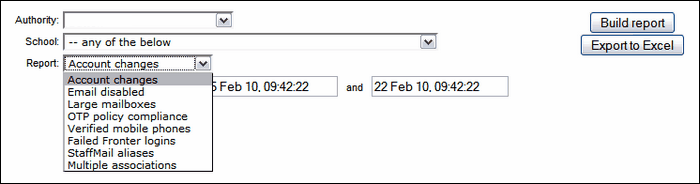
See next - report types:
