The Account changes report allows Nominated Contacts to view a summary of changes to USO accounts. Depending on the user's level, a summary can be viewed for an entire LA or a single school.
Select the school, if you have access to more than one, or leave the "any of the below" to view them all.
The chosen report should be set to Account changes.
Select the dates for which you would like to view a changes summary. By default, the dates cover a seven day period up to the present moment. You can change this to whatever you require.
Click on Build Report to view a summary within the browser. After the report has been generated in the browser, you can click Export to Excel to create a spreadsheet of the data.
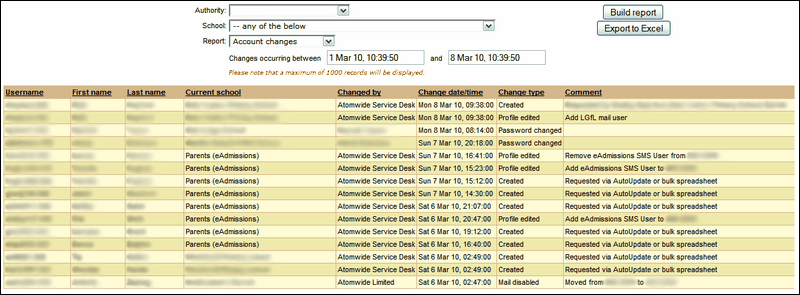
The results will show the Username, first and last names and the school of the person who made a request for change, who implemented the change and when, what the change was and any additional comments regarding the action.
The list is a read-only summary and any further action to be taken must be initiated from a different part of the support site.
See also:
