This section of the guide is out of date.
Freedom2Roam has now been released and replaces RAv3. Guidance on using Freedom2Roam is available here.
You may also have been granted permission to access your office computer. This can be done in one of several ways.
When you log in to your remote site, the type of access you have been granted will appear as a tab in the left part of the screen. You may see tabs called VNC Connections, Terminal Servers or Terminal Servers (Vista). A link will be available under one of these headings. You may need to click on each one in turn to find the link. The tab in which you find the link will depend on what option has been made available to you.
All buttons except AnyConnect will be visible to all users regardless whether or not they have been configured for use.
The AnyConnect button will only be visible to users who have that capability enabled.
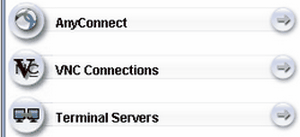
Clicking on any of these will show you whether a connection has been configured for you. This will become obvious if a link appears in the central section of the screen.
See also:
