The Contacts tab within the LGfL deployment section will be used by Virgin Media engineers to find out who to contact regarding your network installation.
The list below the LGfL order contacts heading will be shown in grey and contains people in the school who are potential contacts for the network installation.
The column titled Main will contain a Yes for the person who is considered to be the main contact. This will be the first person whom Virgin Media initially contact to discuss arranging a site survey. Initially, the main contact will often be the Head teacher and you may wish to change this if it is not appropriate.
Initially, all names below will be on a grey background. This indicates that the names have come from LGfL's database.
Ideally, this list should be replaced with one you create yourself.
The second list, below the heading Authorised USO contacts contains a list of individuals who are authorised to deal with issues on behalf of your school. You do not have the ability to change this list as it is comprised people with specific USO profiles within the school or LA.
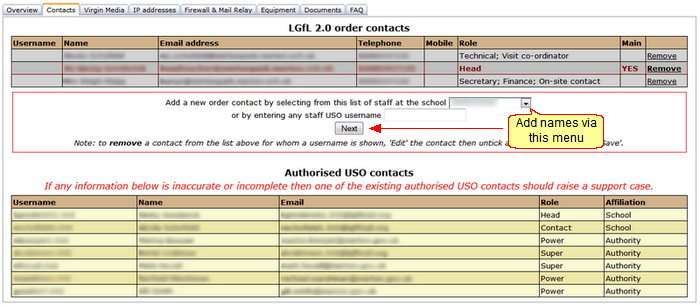
You may (and should) remove the original LGfL order contacts (by clicking Remove next to each person's name). You should then update the list with the correct individuals.
Your updated list should ideally not include anyone listed on a grey background. Instead all the names should be on a yellow background.
To add names to the list, use the dropdown menu below it to select one member of staff at a time or enter their USO username into the available text box.
Once a name is selected, click Next. An editing interface will open.
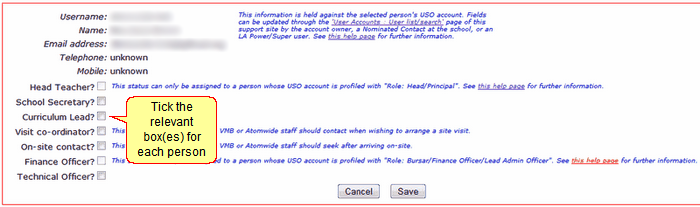
For the selected person, tick all the boxes that apply. Click Save.
 You will not be able to tick the Head teacher or the Finance officer options as these must be defined elsewhere in the person's USO profile. Therefore the Head and Bursar profiles should show automatically if the person's USO profile is correct. If the individuals in question do not have these profiles despite being in that role, please raise a support case and let the Service Desk know that their USO profiles need to be updated.
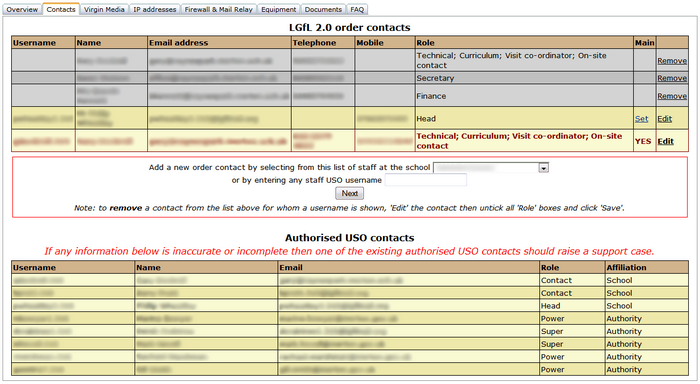
Any names you add will appear under the LGfL order contacts heading but will be on a yellow background.
These names can also be removed if necessary but to do this, you must click Edit and clear (untick) any tickboxes against their name rather than deleting the name itself. If all tickboxes are cleared, the name will disappear from the list after you click Save.
See next:
