The IP addresses tab within the LGfL deployment section is intended to act as a confirmation of your IP ranges or a place where you are able to provide us with updated information if any part of it is incorrect.
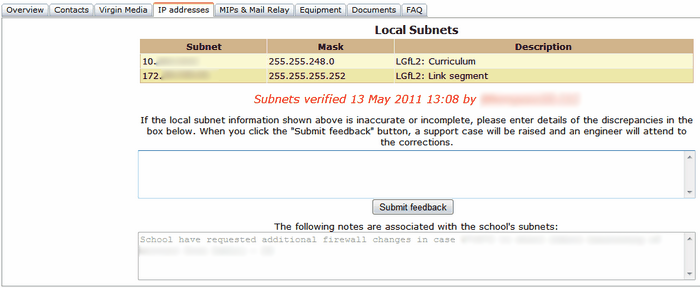
Your subnets need to be confirmed so that Wavenet Education can be certain the information we hold against each school is correct and up-to-date.
Once confirmed, this tab will say Subnets verified in red, the date on which it was verified and by whom. Until this happens, this section will say Unverified.
Verifying your subnets
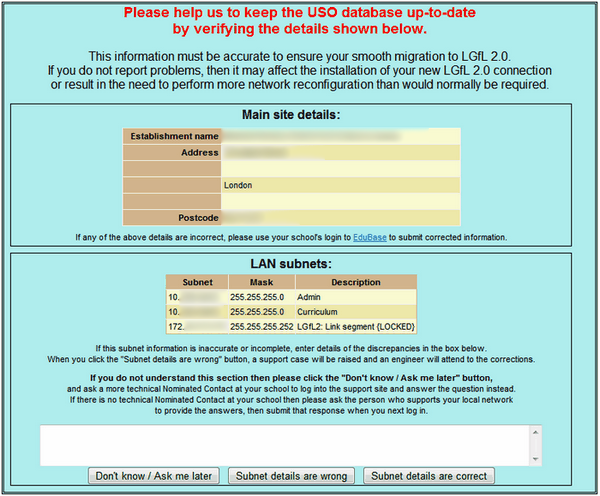
If your subnets are correct, you will need to indicate this by clicking the Subnet details are correct button when you see the following prompt while logging into the support site.
When you see the prompt shown above, please provide a reply as soon as possible. This will stop the message from appearing again.
However, if any or all the details are incorrect, please enter an explanation (at least a few words) and click the Subnet details are wrong button.
Alternatively, if you click the Don't know button and get into the support site you can amend your subnet details by going to My Account >> LGfL deployment >> IP addresses tab. You can then enter your corrections/explanation into the text box provided and click Submit feedback.
Either of these actions will result in a support case under the subject of Domains and DNS with the summary "LGfL subnet correction" being opened for your school in order to resolve the issue.
Notes
Below the Submit feedback button is a Notes section for use by Wavenet Education. If a school has a special request notes on these will be entered by the Service Desk, with a reference to a case number if this is relevant. The notes will be seen by schools in a read-only format.
Link segment IP
In addition to your subnets, you will find an entry for a Link segment. This is the network link between the school's router and firewall. It is assigned to every school and is required for managing the devices.
See next:
