A member of staff has changed their name, can their alias be changed to reflect this?
If a member of staff changes their name, for example as a result of marriage, a method for re-creating the account so the username reflects the new surname is available. This can be done by the Service Desk and can be requested by raising a support case.
However, in circumstances where the member of staff wants to retain their original account but have their school email address use their new surname the alias can be updated.
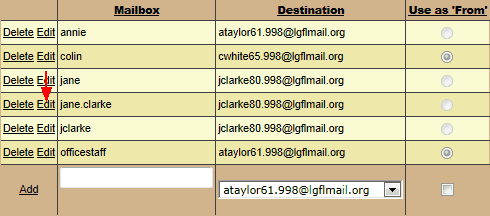
To do this find the alias by going to Email > LGfL StaffMail accounts and selecting your school's domain from the Domains menu. Once you have found the alias click Edit.
You can now change the text that appears in the Mailbox column and enter the correct name. Once finished select Update
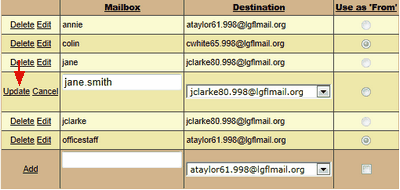
 Please note that the process above will replace the previous alias. If you want to retain the original alias then you can create one or more additional aliases for the member of staff, all of which will point to the same mailbox.
Additional information regarding email aliases can be found here.
