Please see an answer to a number of frequently asked questions on the Freedom2Roam service below.
How do I get support on Freedom2Roam?
Raise a case on https://support.lgfl.org.uk or call 0208 255 5555 option 3 to speak to the Service Desk.
How do I give feedback on Freedom2Roam?
We really appreciate your feedback. The best way to get it to us is to email feedback@adept.education
Have my RAv3 settings been copied over?
Yes. Any configuration your establishment has on RAv3 will also be on Freedom2Roam, with the exception of connection types that are no longer supported. The settings appearing on both systems does also include any future configuration changes that are made. This allows for both systems to be run concurrently and simple switching between the two if desired.
Can I continue to use RAv3?
Yes. RAv3 will continue to be accessible while we are transitioning schools onto Freedom2Roam but we will be sending out further communications in the future with regards to the decommissioning of this service.
What bookmark types are available?
Currently RDP & VNC connections are supported with Freedom2Roam. HTTP, HTTPS, CIFS & FTP bookmarks were available in RAv3 but unfortunately are not in F2R due to the underlying technology in F2R not supporting these connection types.
How do I bring up the menu when connected to a device?
Please hold Ctrl + Alt + Shift on your keyboard or swipe left across the screen if you are on a touch screen device.
Why doesn't my VNC connection work?
Please ensure that both a VNC client is installed/configured on the device that you are trying to connect to and a password is saved on the configuration. More info is available here.
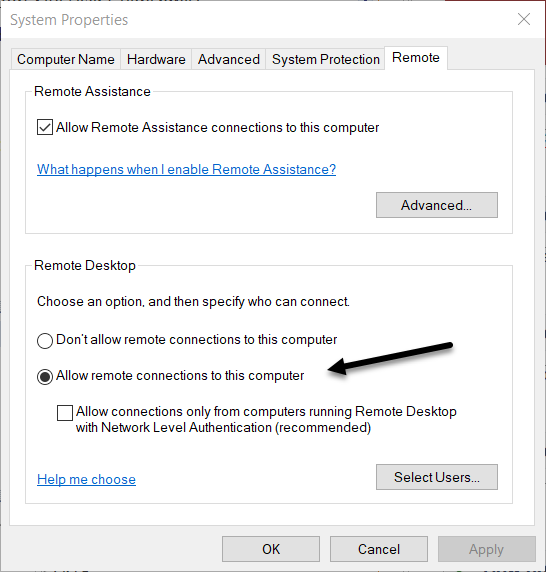
What do I need to do to my computer to RDP to it?
You must allow remote access to your computer in control panel. If you would like to tick the box to allow connections from computers running RDP with Network Level Authentication (NLA) you must save a username and password on the connection's bookmark. This is due to the way that NLA works as it requires the connecting user to authenticate themselves before a session is established.
Do I need to enter @dfecode after my username when logging in?
If you are logging into the Freedom2Roam web interface you will not need to. Your connections for all establishments will be shown.
If you are connecting through AnyConnect this is still required to access a different establishment's IP range.
If I add a password to the configuration can anyone see this?
No. The passwords saved in Freedom2Roam are encrypted and can not be viewed.
