The Federation data release page is available to Headteachers only and is found under the User Accounts tab.
Background
As part of your LGfL subscription, your establishment has access to a wide range of premium software from commercial providers that would cost many thousands of pounds if purchased separately.
Some of these software packages have been enhanced to be "LGfL aware" – that is, they include additional, unique features linked to your staff and pupils' USO accounts. For example, the popular website "MangaHigh" can "know" the names of your classes, along with their teachers and pupils. This makes the process of setting up MangaHigh accounts automatic - a job that would otherwise be very time-consuming and require continual manual updating.
LGfL has established a "Federation" of carefully-selected partners that may, with your permission, access USO data. LGfL has strict rules in place (called Data Sharing Agreements) to regulate this activity. No user's information will be shared with any Federation partner without the express consent of that user's Headteacher (or equivalent).
Access by Federation partners to your establishment's data is managed through the Federation data release page of the support site by the Head Teacher only. The page summarises what, if any, data is available to which Federation partners and why. It also allows a Headteacher to switch on, or off, any data sharing links.
Releasing data
By enabling, or leaving anything previously enabled, any or all of the data links with Federation partners, a Head Teacher is agreeing, as Data Controller for their establishment, to share the specified data with the Federation partner(s) for the purpose(s) described, in accordance with the data sharing agreement between LGfL and the relevant partner(s).
The settings:
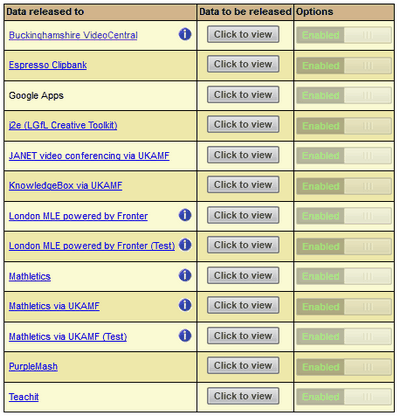
The list of services below indicates what is available for use, subject to the data release option being enabled in each case.
This list may vary between schools and Local Authorities, or other aggregated school groups, and only becomes active once the Head Teacher has accepted the Data Release declaration on the Declaration Management page that can be found under the Head's My Account tab of the Support Site.
•To view information about a service, click on its title. This will take you either to the service's home page or link you to the available information.
•To view information about the specific data being released via LGfL's secure information exchange process, known as Shibboleth, use the Click to view button in the Data to be released column.
•To view any additional information, where this has been provided, please press the blue  button.
•To enable or disable the release of data for a particular service, click the buttons in the Options column, to toggle between Enabled and Disabled states. The current state will be clearly displayed at all times.
Please note: For some services, some functionality may be available without the establishment releasing user data. However, support may not be offered for partially enabled services, and the disabling of any data release for a service that is still in use may be highly disruptive.
Care should therefore be taken with the use of these options, as the impact of a change may occur without further notice. Guidance can be sought from your Local Authority, school or other group management, or the LGfL Service Desk if you are in any way unsure of the use of these settings.
