The Declaration Management page is found under the My Account tab and can be signed off by Headteachers only unless the Head has used the functionality provided on the web page to delegate the responsibility to one of the Nominated Contacts.
Certain declaration types have an additional requirement that in order to sign them off, the person approving them must also have a registered OTP tag.
What this page does
This page is used to manage any locally-obtained declarations of compliance or waiver, where the use of a process or technology carries certain obligations, or risks, that the establishment's attention should be specifically drawn to.
However, the lack of a declaration for any given subject should not itself imply the acceptability of a particular process or technology.
The acceptance of these declarations is required to be made by a school's Headteacher (or a Designated Data Manager), in recognition of their status as Data Controller under the Data Protection Act 1998, or in view of the financial or security implications associated with the topic of the declaration.
These declarations are intentionally applied to a minimum of subjects, and are intended to help protect the school, or other eligible establishment, during the dispensing of its many duties.
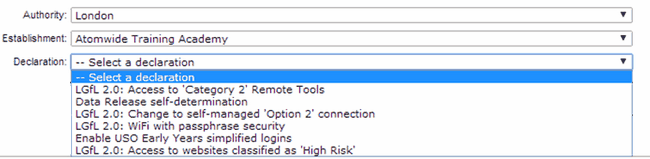
The declarations can be read on the USO support site by selecting each one from the menu. Headteachers can then click the Approve button for the declaration they wish to sign up to.
Who approves declarations
Unless specific action is taken by the school, only a Headteacher has the ability to approve a declaration.
A Headteacher may wish to delegate the approval of declarations to be carried out on their behalf by one of the school's Nominated Contacts. This person will be given the permission called "Designated Data Manager" if the process outlined below is followed.
The Declaration management page in the USO Support Site allows this to be done online.
The Headteacher will be the only person who can see the link illustrated above.
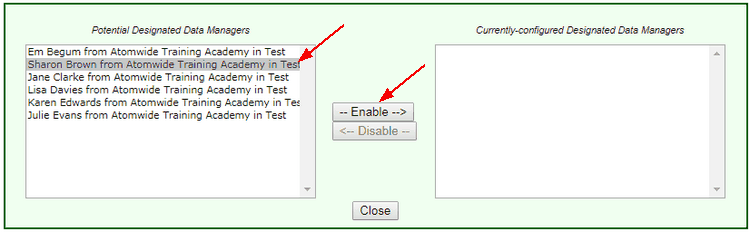
The link will open a popup where the Headteacher can choose from the school's list of Nominated Contacts to whom to delegate this responsibility.
Select a person by clicking on their name.
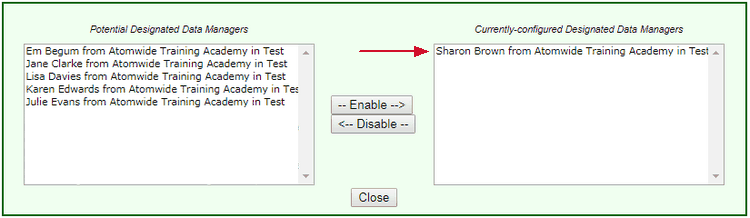
Then click Enable to set the selected person up as a Designated Data Manager. The action is completed when the person appears in the box on the right and the popup may be closed. No further saving is required.
The action may be reversed by selecting the person on the right hand side and clicking Disable. Once the name moves back over to the left, the person's permissions have been removed.
The following declarations can be approved by the Designated Data Manager:
•LGfL: Access to ‘Category 2’ Remote Tools
•LGfL: Change to self-managed ‘Option 2’ connection
•LGfL: WiFi with passphrase security
•Enable USO Early Years simplified logins
•LGfL: Access to websites classified as ‘High Risk’
When a declaration is approved, everyone with the ability to approve them will be notified by email.
When the Access to 'Category 2' Remote Tools is agreed to, the school's web filtering administrators will be able to configure school filtering to include sites categorised as Remote Tools.
What are the technical consequences of signing the declaration to release Category 2 Remote Tools sites?
When a Head Teacher signs the declaration to release category 2 remote tools sites a case is generated on this support site to trigger two specific changes which are implemented by Wavenet Education staff.
The process for this happening is as follows:
As soon as the Head Teacher or delegated representative clicks “Approve” a support case is generated on the USO support site. This triggers two specific actions which are implemented by Wavenet Education engineers.
1.A new category becomes visible in the WebScreen list of categories – Remote Access Tools. This category will be blocked in all polices and cannot be allowed. Instead as WebScreen administrator will need to allow the individual sites they require access to within the individual school based policies.
2.A second change happens at the back-end only. A number of Category 2 sites are blocked through firewall settings which are designed to deny access to specific target IP addresses. These firewall restrictions are lifted following the signing of the declaration. As a result, certain gateway and redirection sites, which share the same IP address as a previously blocked Remote Access service, will become visible even without any changes being made to any policies within the school. This should not cause security concerns as the sites to which they redirect would still need to be explicitly allowed by the school in order to work.
|
When the Data Release self-determination declaration is agreed to, data release must then be enabled via an additional page. This must also be done by the Headteacher.
|
When the Access to websites classified as 'High Risk' is agreed to, the school's web filtering administrators will be able to configure school filtering to include sites categorised as High Risk.
When the declaration is approved a new category becomes visible in the WebScreen list of categories - High Risk. The category will be in the blocked list for all policies and cannot be allowed. Instead a WebScreen administrator will need to allow the individual sites they require access to within the school based policies.
|
Approving this declaration will allow pupils in primary schools to access online teaching and learning resources via a simplified login into the myUSO website.
All pupils will automatically have a 4-digit PIN created for them which will be their birthday, in the format or ddmm. Each pupil will also have a QR code created that embeds their details such as name, school, class year. These changes will allow pupils to sign in by replacing their password with a code and even by scanning their QR code into a device so that their username is automatically entered and all the pupil needs to put in is the PIN.
For schools using SIMS and Integris G2, an additional option, whereby pupils log in by answering a series of simple questions, will also become available.
|
See also:
Data release management