Once USO-AutoUpdate is enabled and running successfully it is possible for schools to export more than the core USO data. Schools can export class-teacher relationship information which is then used in USO-enabled services.
If you wish to use the Early Years login option available for the myUSO website, the data described below must be exported.
 Please note: these data exports are at present only possible for schools using SIMS using the USO-AutoUpdate exporter and not any other exporting product.
Enabling additional data exports
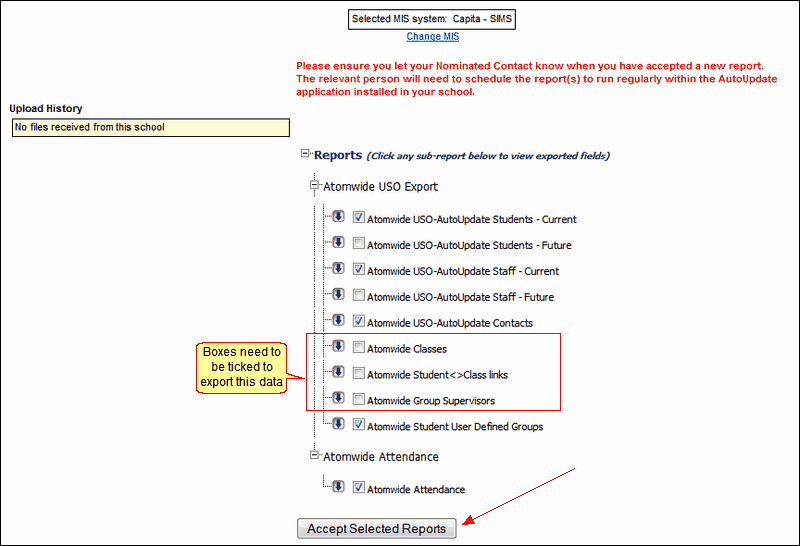
If your school is already running AutoUpdate, your page view (found under the User Accounts >> AutoUpdate settings menu) will resemble the one below (with some buttons already green).
To enable data exports that establish class-teacher relationships in USO, the following sub-reports will have a blue arrow next to them but the boxes need to be ticked for:
•Atomwide Classes
•Atomwide Student <>Class links
•Atomwide Group Supervisors
The Head Teacher will need to go to this page, tick the three boxes highlighted below and click the Accept Selected Reports button. (The Head Teacher is the only person in the school with access to this button. Nominated Contacts are not be able to carry out this function. )
No further configuration is required. The required data will be exported in the next USO export.
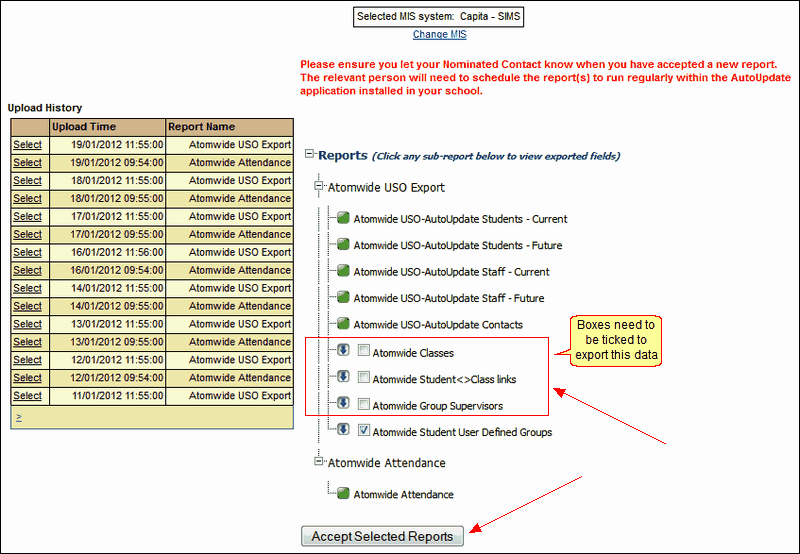
If AutoUpdate is already enabled, it is possible that these fields are already being exported.
If each of the fields highlighted above has a green button next to it, then there is nothing further you need to do.

See also:
