 The actions described below do not apply to schools whose LA policy states they are not able to transfer users in from another school. For these schools, the Pick function will be disabled and it will be necessary to Raise a Support Case instead.
If you have tried to create a user who already exists in the school, you will see the following:
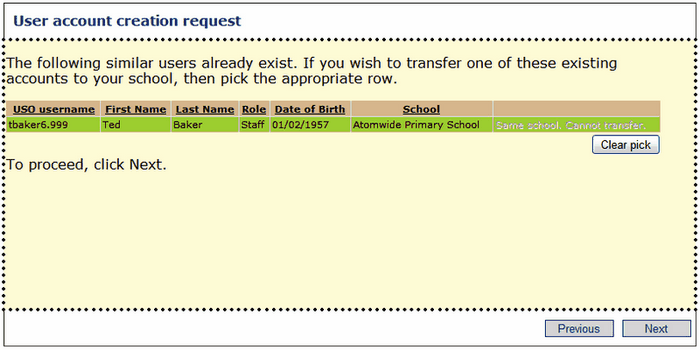
You may see the user's name appearing in a green coloured row. This will be the closest match available and indicates an existing account within the same school. If this is the person whose account you wish to create please do not go any further as the account already exists in your school.
You may also see more than one result. You may see a close match highlighted in green but you may also have other potential matches listed. If it matches one of the other suggestions, click on the Pick link to the right of the relevant user's name.
OR
If the relevant user account already exists but is associated with a different school, you will be able to click Pick and transfer that user into your school.
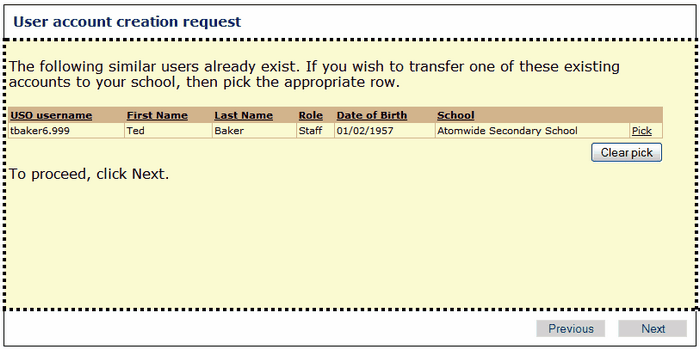
Click Next to continue. Your selection will then be confirmed in the next screen.
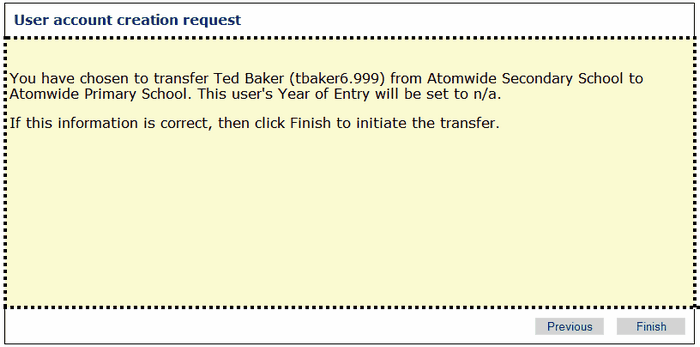
If you are happy to proceed, click Finish. The final screen will confirm that the person has been transferred from a previous school to the school you selected.
No further action is required.
