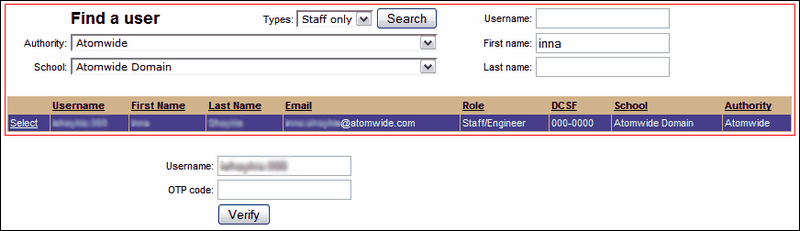
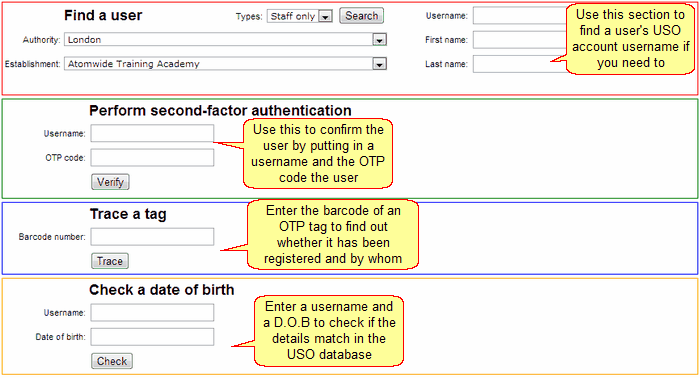
The Identity Verification function under User Accounts is available to Nominated Contacts for various different functions.
Nominated Contacts can look up users individually to find their usernames, they can also trace OTP tags and verify them. Additionally dates of birth can be checked to ensure that the information check and verify people by staff to ensure that school staff who contact the LA are using their own credentials to identify themselves.
This functionality is designed to help verify users' USO accounts as well as find out whether an OTP has been registered and if so, by whom. For example if you work on a help desk supporting a school, you can verify callers by carrying out any of the tests below.
Second-factor authentication
To verify a USO account, ask the person for their username (including the 3-digit LA suffix) and an OTP code generated specifically for the verification process.
To confirm that the person is who they claim to be, enter their username and OTP code into the correct fields and click Verify.

You will be informed whether authentication has Succeeded or Failed.
Tracing a tag
If you need to find out whether a particular OTP tag has been registered and if so, to whom it belongs you can enter the barcode found on the reverse of the tag into the box provided and click Trace.

You will be informed who registered the tag and on what date.
Checking a D.O.B
To check that the D.O.B that is listed in a USO account is correct type the username and the D.O.B for the person.
The click Check.

If the D.O.B typed in matches the D.O.B that is listed on the USO account that was entered the following message will show:

If the D.O.B typed in does not match the D.O.B that is listed on the USO account or the username is not valid that was entered the following message will show: