One of the challenges facing all of us is keeping on top of the mountain of electronic information and personal data we process whilst complying with data protection legislation. As part of LGfL's Data Protection and GDPR programme, we periodically flag inactive StaffMail mailboxes (that have not been accessed in the last 12 months) to be disabled and later deleted. This process helps schools avoid a situation where they inadvertently process personal data for longer than it needs to and helps to ensure that personal data that is processed is absolutely necessary.
When accounts are flagged as inactive, schools are notified via email of the mailboxes in question, and if no action is taken to retain the mailbox, another email is sent when they are disabled/scheduled for deletion. You can view the flagged mailboxes and take action to retain them on the LGfL StaffMail inactive mailboxes page on the Support Site.
 Please note that these actions only apply to the StaffMail mailbox and not the USO account. The USO account will remain untouched until it is no longer associated with your MIS or you inform us that you wish the USO account to be deleted. USO accounts that are no longer associated with your MIS will be automatically deleted, along with all associated data, after 12 months but we can delete these sooner should you require us to do so.
Retaining mailboxes
Unless there is a requirement to retain any of the mailboxes identified by this process (perhaps as a result of maternity / paternity leave or long-term illness) and action is not taken, they will be deleted. If you do not choose to retain a mailbox, please ensure that any data in the mailbox that needs to be retained is copied locally before the 'Disable After' date.
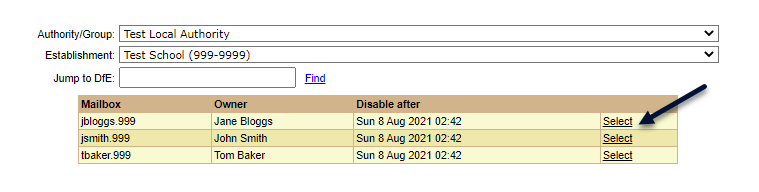
If you need to retain some mailboxes, then please identify them accordingly by visiting this page on the Support Site. On this page, you will see the mailboxes that have been identified and you need to first press Select next to any you wish to retain.
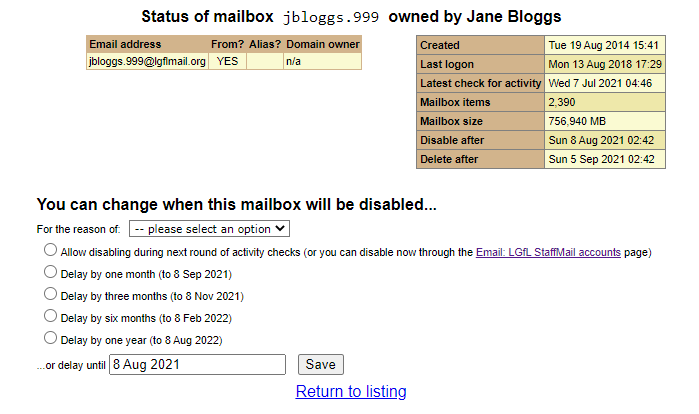
This will load a page with information regarding that account. To change when the mailbox will be disabled, you will need to first choose the reason and then how long you wish to delay the disabling by clicking the relevant radio button. Once you've selected the reason and the when, simply click Save to make the change.
Please note that should a mailbox become active again, it will be automatically cleared from this list.
Removal process
Once a mailbox has been disabled, it will be retained for 28 days (4 weeks), hidden from address lists, will no longer receive any email and further logins to the mailbox will be prevented. At this point, a further email will also be sent with a list of mailboxes that are scheduled to be deleted and the date of deletion.
If you require any further information or support, please don't hesitate to raise a case on the Support Site at https://support.lgfl.org.uk or call the Service Desk on 020 8255 5555, select option 3.
