SMS Senders can view the configuration page, as illustrated below, but do not have the ability to make any changes to the number of messages available or sent.
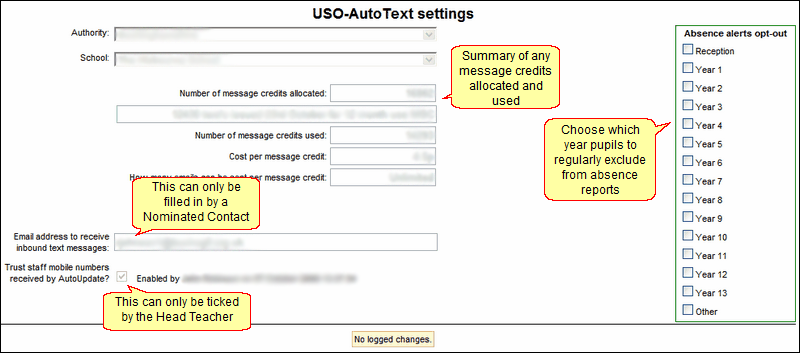
Senders can, however, decide on the Absence alerts opt-out settings (in the green box on the right - see explanation at the bottom of the page). If you are an SMS Sender as well as a Head Teacher or Nominated Contact, you will be able to access options that an ordinary SMS Sender will not have.
Definition of terms
Number of message credits
allocated
|
This field is read-only and is updated automatically when some amount of new message credits is entered into the field directly above this. The new total of message credits is automatically calculated and displayed.
|
Notes
|
A notes field below the credits allocated to a school is accessible to Atomwide staff only. Notes will be entered if needed and will be visible as a read-only field to relevant users.
|
Number of message credits used
|
This is calculated automatically for each school and cannot be edited.
|
Cost per message credit
|
This will display the cost (in pence) of each text message sent.
|
How many emails can be sent per message credit
|
Shows the number of emails that can be sent for a single message credit. Unlike text messages, this ratio is not 1 to 1.
|
Email address that receives
inbound text messages
|
This is the address that receives any texts received in reply to messages sent by AutoText. It can be set ONLY by a Nominated Contact who is also an SMS Sender.
|
Trust staff mobile numbers
received via AutoUpdate
|
The decision to trust staff mobile numbers can be made by the Head Teacher only.
This tick-box will be greyed-out (unavailable) for all other users.
This means that although these numbers have not been verified via the official process, it will be possible to use them for the same purpose, such as receiving a new password. Without the mobile number either being verified or the above-described tickbox being ticked, this functionality will not be possible.
Please note that any change to this field will come into effect following the next scheduled data export via AutoUpdate (usually overnight).
|
Head Teachers-only functionality
If you would like to have the mobile numbers of all staff considered as "verified", you can tick the box next to Trust staff mobile numbers received by AutoUpdate. This will make those numbers available for use in functionality associated with the support site but does not guarantee that the numbers are correct. It simply precludes each member of staff from having to go through the verification process.
 Only a Head Teacher who also has SMS Sender permissions will be able to tick this box. Only a Head Teacher who also has SMS Sender permissions will be able to tick this box.
Nominated Contacts-only functionality
A school must specify an email address to which people can reply if they receive an email via AutoText. This is done via the AutoText >> Configure Settings.
You must be a Nominated Contact who also has SMS Sender permissions in order to fill in this field. No other person, including a Head Teacher (unless the Head is also a Contact) is able to do this.

Click Update to save any changes.
Ticking the absence alerts opt-outs will create a default setting for absence reports (see the Opting out section below). The settings configured on this page will be the default ones even if they are changed when viewing the absentee list under Send messages > Pupil absence. The change log will show any changes made to your school's credit allocation.
|
