LA SMS administrators' configuration page
 In order to view and change the settings on this page, LA-level users need to have the LA-level SMS Administrator profile AND SMS Sender profile added to their USO accounts. Both profiles are essential to be able to allocate credits.
School-level SMS Senders (including Head Teachers and Nominated Contacts) will see a different version of this page containing information relevant to their schools only.
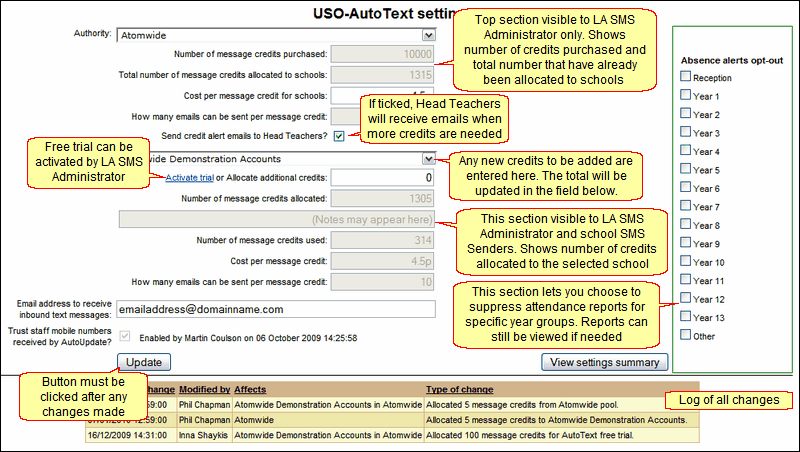
When entering this page view, your LA will be named in a greyed-out field.
Text and email settings fields explained
Number of message credits purchased |
This is filled in by Atomwide when credits are bought by the LA. The LA SMS administrator does not have the ability to alter this field. |
|
|
|
|
|
|
Activate trial or Allocate additional credits |
|
|
|
|
|
|
|
|
|
|
|
|
|
|
Please note that any change to this field will come into effect following the next scheduled data export via AutoUpdate (usually overnight). |
After any change has been made, it is essential to click the Update button in the lower left corner. This ensures the changes take effect and adds it to the change log at the bottom of the page. The change log will display all changes made within the LA if no school is selected. If a school is selected, only the changes relevant to that school will be shown. Schools will see only changes relevant to them.
The View settings summary button in the lower right corner will produce a summary of all activity, stating how many credits have been allocated to each participating school and how many have been used.
Any school not yet using the USO-AutoText service is entitled to a free trial. The LA administrator will see a blue link called Activate trial below the school's name. The link appears only if the school has not yet used AutoText. The free trial can only be activated once. The selected school will receive 100 free credits that are not deducted from the number of credits purchased by the LA. Once the 100 credits are used up, the school can be allocated additional credits by the LA. A school can also purchase additional credits directly from Atomwide.
