The Password Vault has been designed to provide a secure area where you can store passwords to any site or other resource you use that requires a username and password to log in. Usage of this facility should comply with any LA policies which may exist.
This facility is available to every staff user with a USO account.
Password Vault can be accessed in two ways:
1. Log into the support site, then go to My Account > USO Password Vault
2. Go directly to https://support.atomwide.com/vault and log in with your USO credentials
Accessing the vault directly, allows you to log in and log out without going through the support site.
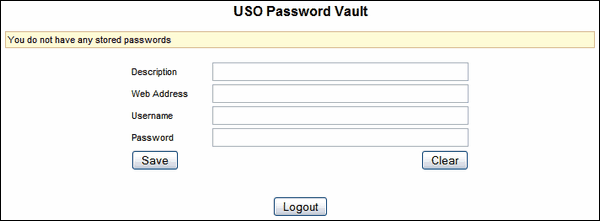
Accessing the vault from the support site provides the same interface but does not allow you to log out from the vault alone as you would need to log out from the whole support site instead. Therefore the Logout button does not appear at the bottom (as below).
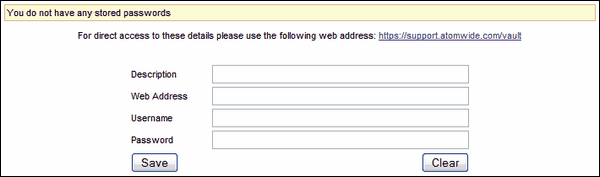
To store passwords, simply fill in each field with the correct details. The Web Address field may be left blank if the username and password being stored are for another type of resource.
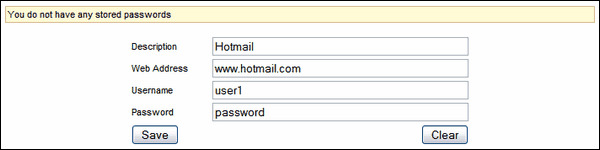
Click Save.
The details entered will appear in a table at the top of the page.

Once details for one or more sites have been saved you can click on Show in the Password column for the relevant site to reveal your password for that site.
To delete any site and related password details, click Delete to the left of that site.
To change any of the details you have previously saved, click Update to the left of the relevant web address. The saved details for that website will populate all the fields below it automatically.
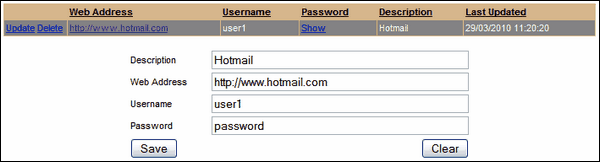
Then simply change the details in any of the fields. In the example below the password has been changed.

Click Save.
The new details for that website should now be displayed in the table. If you have changed your password, click on Show in the Password column for that website to reveal the new password.

When you have finished using the Password Vault you can either log out if that option exists or continue to carry out other functions within the support site.
