|
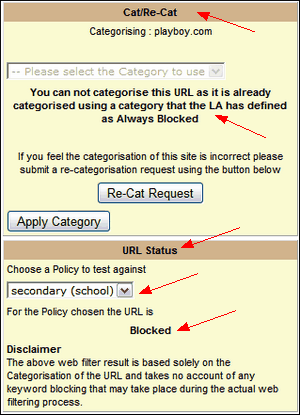
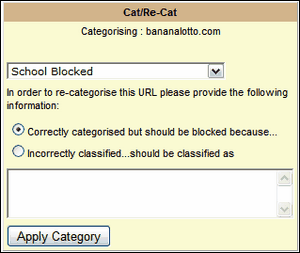
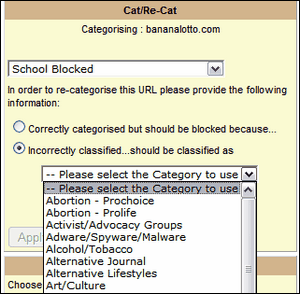
Once you have obtained a url's categorisation, the Cat/Re-Cat section will show whether you have the power to categorise it for your school. If you have the ability to categorise it, a dropdown menu with two options will be available. Alternatively, bold text (see image on left) will inform you otherwise. If the url has been "always blocked" by the LA, it will be stated in the Cat/Re-Cat section and it is not possible to allow it at school level. If a url is defined as "always allowed" by the LA, it cannot be blocked at school level. A school can try contacting the LA directly if needed. If you believe the url should be classified under a different category, click Re-Cat Request and submit the form. The request will be reviewed and the url may be re-categorised. The new category may also be subject to an LA-wide rule but if none has been set, individual schools will be able to decide whether to allow or block it. The URL status section will allow you to test whether the url is allowed or blocked when it is accessed using different policies. Please also ensure that you have read and understood the disclaimer at the bottom of this section. |
|
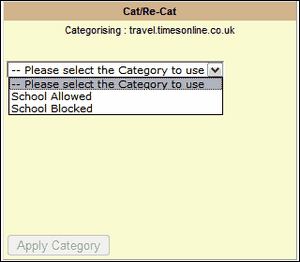
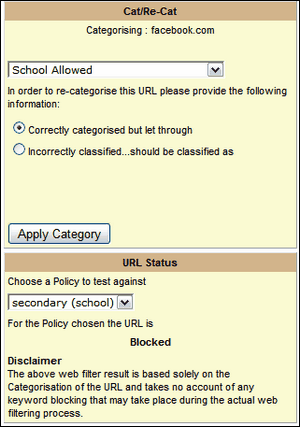
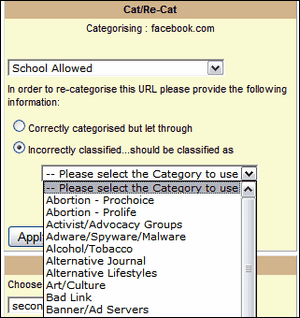
If the LA has not set any restrictions on a particular url, you will have the option to decide how to treat this url at your school. From the dropdown menu you can choose to allow or block the url in question. Once you have made a selection, you will need to provide additional information, depending on the option chosen. |